GTM Once-Per-Session Trigger Architecture
View Demo
What was done
Why This Exists
The current GTM implementation contains multiple click, scroll,
and engagement events configured as GA4 key events/conversions.
Because these events can fire repeatedly within a single user session,
they can artificially inflate conversion counts and negatively impact:
- Google Ads Smart Bidding
- Performance Max learning
To mitigate this issue while preserving reporting visibility,
the events below should fire:
ONE TIME PER SESSION
How Session Storage Works
The implementation uses the browser's
sessionStorage API.
Session storage persists data:
- For the duration of the browser tab/session
- Until the tab/browser is closed
- Across page navigations within the same session
Example
sessionStorage.setItem('linkedin_click', 'true');
Once set, GTM can check whether the event already occurred:
sessionStorage.getItem('linkedin_click');
| Action |
Behavior |
| First click in session |
Event fires |
| Second click same session |
Blocked |
| Refresh page |
Still blocked |
| Close browser tab |
Session resets |
| New session tomorrow |
Can fire again |
Reusable GTM Variable
Custom JavaScript Variable
Name:
JS - Event Once Per Session
function() {

  var type = '';
  var identifier = '';

  // VIDEO EVENTS
  if ({{Video Percent}}) {

    type = 'video';

    var videoUrl = {{Video URL}} || '';

    var cleanVideo = videoUrl
      .replace(/^https?:\/\/(www\.)?/i, '')
      .replace(/[?#].*$/, '');

    identifier =
      cleanVideo +
      '_' +
      {{Video Percent}};

  // SCROLL EVENTS
  } else if ({{Scroll Depth Threshold}}) {

    type = 'scroll';

    identifier = {{Scroll Depth Threshold}};

  // CLICK EVENTS
  } else {

    type = 'click';

    identifier =
      {{Click URL}} ||
      {{Click Text}} ||
      {{Click ID}} ||
      {{Click Classes}};

  }

  // Prevent invalid values
  if (
    identifier === undefined ||
    identifier === null ||
    identifier === ''
  ) {
    return false;
  }

  var normalized = identifier
    .toString()
    .toLowerCase()
    .trim()
    .replace(/\s+/g, '_')
    .replace(/[^a-z0-9_\-\/]/g, '');

  var key = 'session_event_' + type + '_' + normalized;

  // Already fired this session
  if (sessionStorage.getItem(key)) {
    return false;
  }

  // Set session flag
  sessionStorage.setItem(key, 'true');

  return true;

}
This creates a unique session key dynamically based on:
- Event type (video, scroll, click)
- Video URL + percentage (for video events)
- Scroll threshold (for scroll events)
- Click URL, Text, ID, or Classes (for click events)
Simple Configuration - Just Add One Condition
Once you've added the JS - Event Once Per Session variable,
you only need to update your existing triggers by adding ONE condition.
This is the most elegant solution with your current GTM setup:
Step-by-Step Configuration
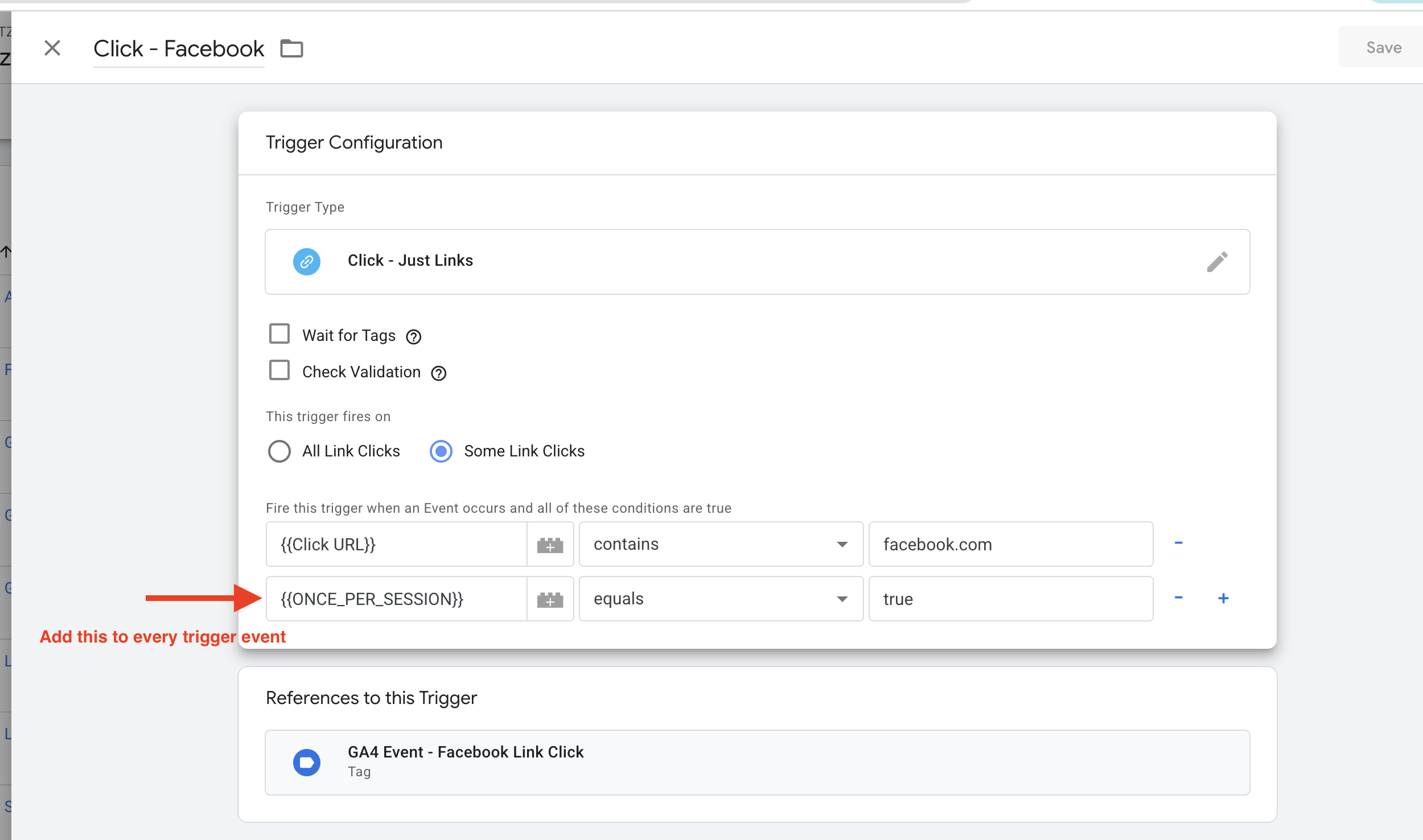
- Open each of your 12 triggers (LinkedIn, Facebook, Apple Store, Google Play, Telephone, Book a Demo, Get Access Now, Give it a Try, Learn More, Sign In, Scroll Depth, Video)
- Add a new condition:
JS - Event Once Per Session equals true
- That's it - no complex changes needed
Visual Example
Below is an example of how simple the trigger configuration is:
✓ Total time to configure all 12 triggers: ~5 minutes
Recommended Trigger Architecture
| Trigger |
Current Logic |
Recommended Logic |
| LinkedIn Click |
Click URL contains linkedin.com |
Click URL contains linkedin.com
AND
JS - Event Once Per Session = true
|
| Facebook Click |
Click URL contains facebook.com |
Click URL contains facebook.com
AND
JS - Event Once Per Session = true
|
| Apple Store Click |
Click URL contains apps.apple.com |
Click URL contains apps.apple.com
AND
JS - Event Once Per Session = true
|
| Google Play Click |
Click URL contains play.google.com |
Click URL contains play.google.com
AND
JS - Event Once Per Session = true
|
| Telephone Link Click |
Click URL contains tel: |
Click URL contains tel:
AND
JS - Event Once Per Session = true
|
| Book a Demo |
Click Text contains Book a demo |
Click Text contains Book a demo
AND
JS - Event Once Per Session = true
|
| Get Access Now |
Click Text contains Get access now |
Click Text contains Get access now
AND
JS - Event Once Per Session = true
|
| Give it a Try |
Click Text contains Give it a try |
Click Text contains Give it a try
AND
JS - Event Once Per Session = true
|
| Learn More |
Click Text contains Learn more |
Click Text contains Learn more
AND
JS - Event Once Per Session = true
|
| Sign In |
Click Text contains Sign In |
Click Text contains Sign In
AND
JS - Event Once Per Session = true
|
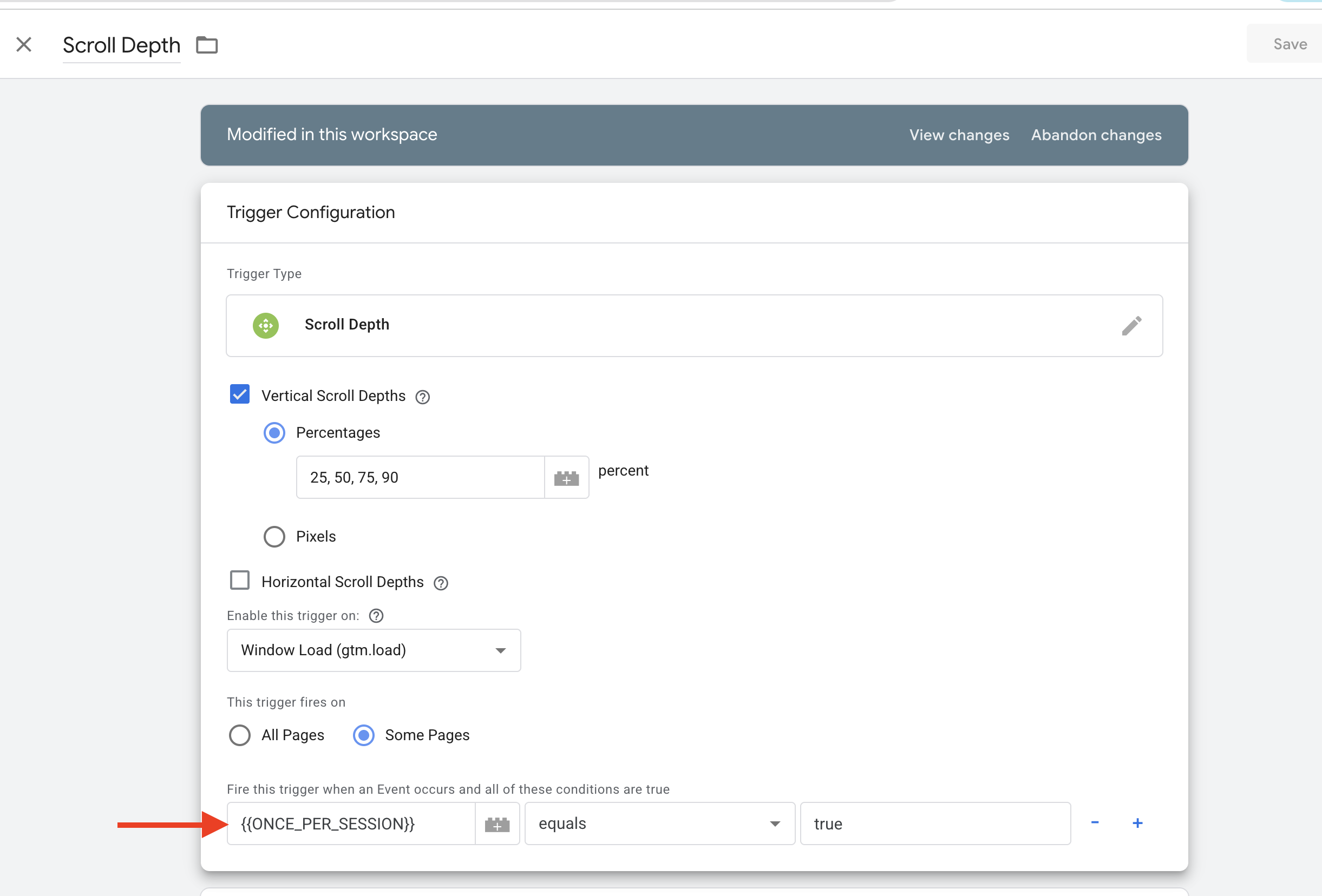
Scroll Depth Events
Scroll depth events should also be deduplicated
once per session PER percentage threshold.
Example
| Threshold |
Behavior |
| 25% |
Can fire once per session |
| 50% |
Can fire once per session |
| 75% |
Can fire once per session |
| 90% |
Can fire once per session |
This prevents:
- Repeated firing on SPA navigation
- Scroll restoration duplication
- Inflated engagement conversions
Example Session Keys
session_event_scroll_25
session_event_scroll_50
session_event_scroll_75
session_event_scroll_90
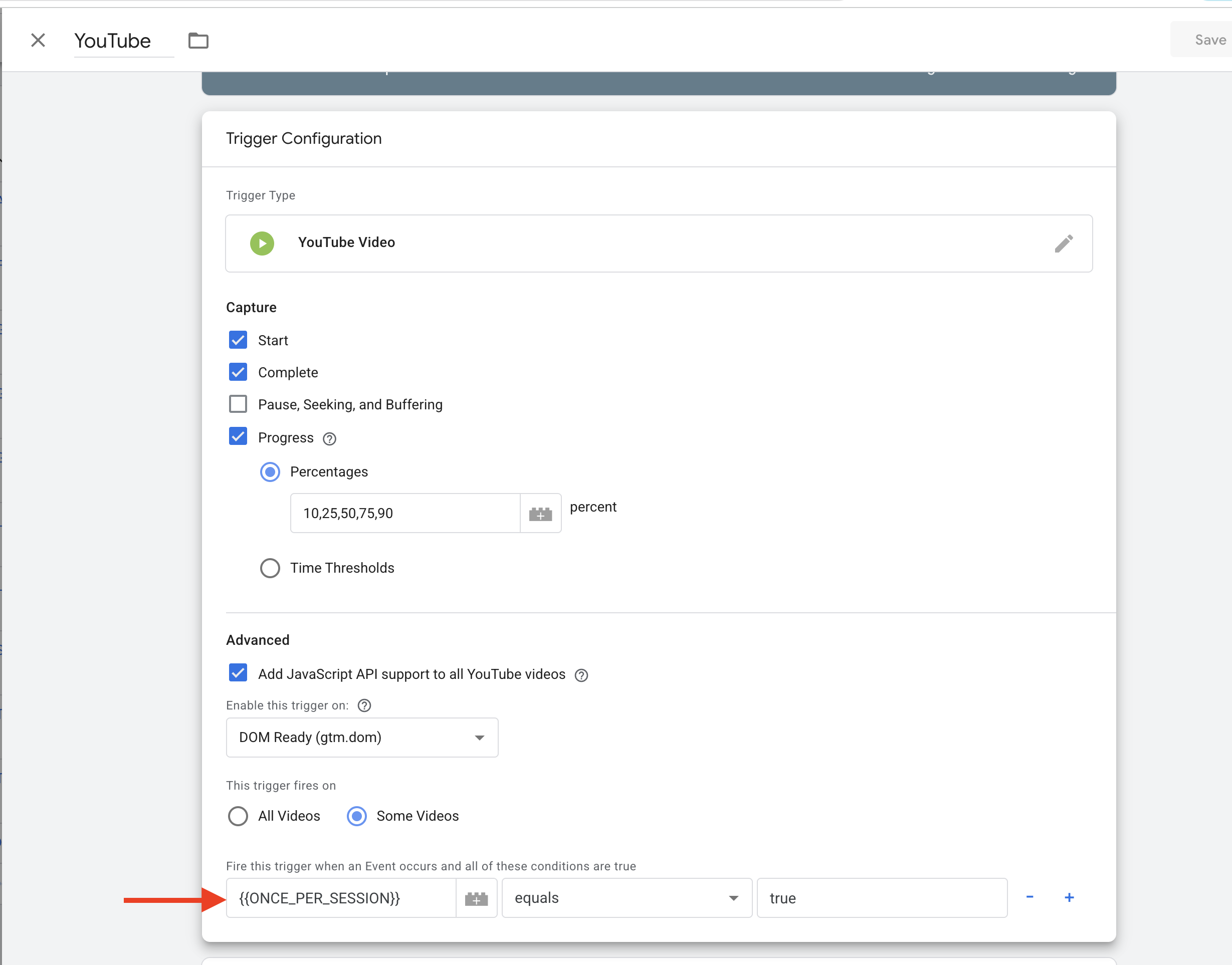
YouTube / Media Events
Video progress events should also fire:
ONE TIME PER SESSION PER VIDEO PERCENTAGE
| Video Event |
Behavior |
| 10% |
Once per session |
| 25% |
Once per session |
| 50% |
Once per session |
| 75% |
Once per session |
| 90% |
Once per session |
| Complete |
Once per session |
Example Session Keys
session_event_video_10
session_event_video_25
session_event_video_50
session_event_video_75
session_event_video_90
session_event_video_complete
This prevents repeated playback loops,
autoplay restarts,
and duplicate engagement inflation.